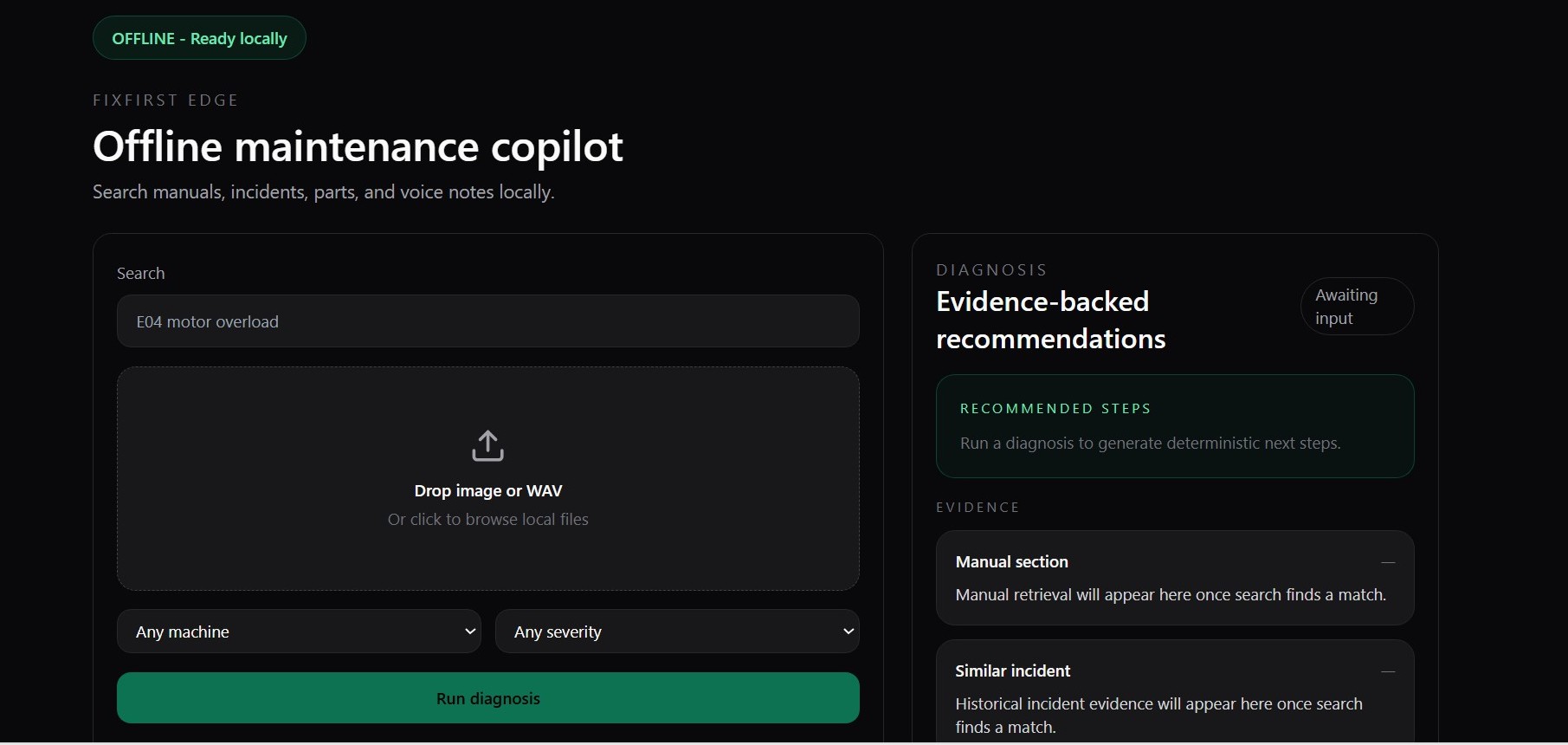
OFFLINE — running locally

Find the fix before the line stops.

FixFirst Edge turns your manuals, parts catalog, and incident history into a multimodal search that runs on the technician's laptop. Photo, error code, voice note — one query, local retrieval, auditable answers. No cloud. No LLM hallucinations. No waiting for signal.

3 in 1
Named vectors per document
Text (384d), image (512d), and audio-transcript vectors — one Actian collection, no cross-store joins.
0
Cloud API calls
All embedding, transcription, retrieval and diagnosis runs on CPU on the same machine the technician is using.
~1s
Warm-query latency
Hybrid RRF over Actian dense ANN plus app-side BM25 scoring, on a laptop with no GPU.
The problem

Unplanned downtime costs ~$50B a year. The fix is usually in a 400-page PDF.

A technician standing next to a broken conveyor typically has four things to search — the manual, the incident log, the parts catalog, and their own memory. On a plant floor with weak WiFi, none of that is fast. Cloud-based AI assistants fail the second the signal drops and hallucinate answers that can't be traced back to a specific page.

FixFirst Edge flips it. One search bar. One local database. Every answer points to a specific manual page, a specific prior incident, and a specific part number. Auditable by design.

What the tech does

Four ways to describe a broken machine. One retrieval pipeline.

01 · type
Error code

"E04 motor overload." Rare tokens like codes get caught by the BM25 side of the hybrid fusion.

02 · drop
Photo of a damaged part

CLIP embeds the uploaded image locally on the same machine. Searched against every image vector in the same collection.

03 · speak
Voice note

faster-whisper transcribes locally. The transcript is re-embedded and searched through transcript retrieval plus a dedicated voice-note vector lane.

04 · filter
Narrow by machine

Any query can be filtered by machine type, model, fault code, or severity — keyword-indexed on Actian's side.

Why Actian VectorAI DB

Three features. One collection. A real multimodal retrieval stack.

FixFirst Edge is built on features that don't show up in ordinary vector stores. Each one earns its place in the request path.

Feature 1
Named vectors

One collection holds three embedding spaces: text_vec (384d, bge-small), image_vec (512d, CLIP-ViT-B-32), audio_text_vec (384d). A single document can carry any subset and be retrievable through any modality.

vectors_config={
  "text_vec": VectorParams(size=384, …),
  "image_vec": VectorParams(size=512, …),
  "audio_text_vec": VectorParams(size=384, …),
}
Feature 2
Filtered search

Six metadata fields are keyword-indexed: doc_type, machine_type, model_no, fault_code, severity, part_no. Filters are applied in-engine, not after the fact.

builder = FilterBuilder()
builder.must(Field("doc_type").eq("manual"))
builder.must(Field("model_no").eq("CX-200"))
Feature 3
Hybrid fusion (RRF)

Text queries run Actian dense ANN and app-side BM25-style payload scoring in parallel, then merge with reciprocal rank fusion. Codes like "E04" score high in BM25; phrases like "motor tripped on overload" score high in the dense branch. RRF covers both.

score = Σ 1 / (60 + rank)
Demo

Laptop in airplane mode. One search bar. Every modality.

Demo workflow
The recorded two-minute walkthrough is the last submission asset to drop in here. Until that publish step, the repo and shot-by-shot demo script are linked below so reviewers can verify the local run path immediately.
Architecture

Everything local. No round-trips.

┌─────────────────────────┐       ┌─────────────────────────────────┐
│  Next.js 14 (frontend)  │  HTTP │  FastAPI (backend)              │
│  UploadZone, SearchBar, │ ─────►│  /api/ingest/*                  │
│  FilterPanel,           │       │  /api/search/*                  │
│  DiagnosePanel,         │       │  /api/diagnose                  │
│  OfflineBanner          │       │  /api/incident/save             │
└─────────────────────────┘       └──────────────┬──────────────────┘
                                                 │
             ┌───────────────────────────────────┼──────────────────────────────────┐
             ▼                                   ▼                                  ▼
   ┌─────────────────────┐         ┌─────────────────────────┐      ┌─────────────────────┐
   │  pipelines/         │         │  services/              │      │  db.py              │
   │  text_embedder      │         │  ingest_service         │      │  init_collection    │
   │  image_embedder     │         │  search_service         │      │  upsert             │
   │  audio_transcriber  │         │  diagnose_service       │      │  search_text /      │
   │  pdf_chunker        │         │                         │      │  image / audio /    │
   │  csv_loader         │         │                         │      │  hybrid (RRF)       │
   └──────────┬──────────┘         └────────────┬────────────┘      └──────────┬──────────┘
              │                                 │                              │
              ▼                                 ▼                              ▼
   bge-small, CLIP-ViT-B-32,        builds metadata,             gRPC → Actian VectorAI DB
   whisper tiny.en (CPU)            calls embedders + db         :50051, collection: incidents
      
Quickstart

Running in five commands.

1 · start the DB
docker run -d --name vectoraidb -p 50051:50051 \
  --restart unless-stopped williamimoh/actian-vectorai-db:latest
2 · install backend
cd backend && python -m venv .venv && source .venv/bin/activate
pip install -r requirements.txt
3 · seed
cp data/fixtures/*.csv data/raw/
# drop your own PDFs into data/raw/manuals/, images into data/raw/images/
4 · ingest + serve
uvicorn app.main:app --host 127.0.0.1 --port 8000 &
PYTHONPATH=. python scripts/bulk_ingest.py
5 · frontend
cd frontend && npm install && npm run dev
# open http://localhost:3000